Exercise 1. Four holes in a plate — your first model in 5 minutes
| Input files | Time | What you end up with | What you learn |
|---|---|---|---|
| none | 5 min | plate.FCStd — one Body (Pad + Pocket), 5 parameters |
Building by talking, checking, changing dimensions, saving |
Original and finished
Section titled “Original and finished”There is no original file. You build it from dimensions alone.
| File | Description | Size | |
|---|---|---|---|
| Finished | 01-plate-done.FCStd | FreeCAD file | 15 KB |
| Finished | 01-plate-done.step | STEP | 13 KB |
| Finished | 01-plate-done.stl | STL | 52 KB |
- Launch FreeCAD 1.1.3. Check the Report view for
[CAD X-ray] 서버 시작 http://127.0.0.1:9877 (툴 36개). - File → New. Keep exactly one document open.
- In a terminal, go to your working folder and open your AI tool (
claude,codex,gemini).
1. Check the connection
Section titled “1. Check the connection”Check the FreeCAD connection and tell me the open document.What the AI does — reads the FreeCAD version and the open document.
2. Make the plate
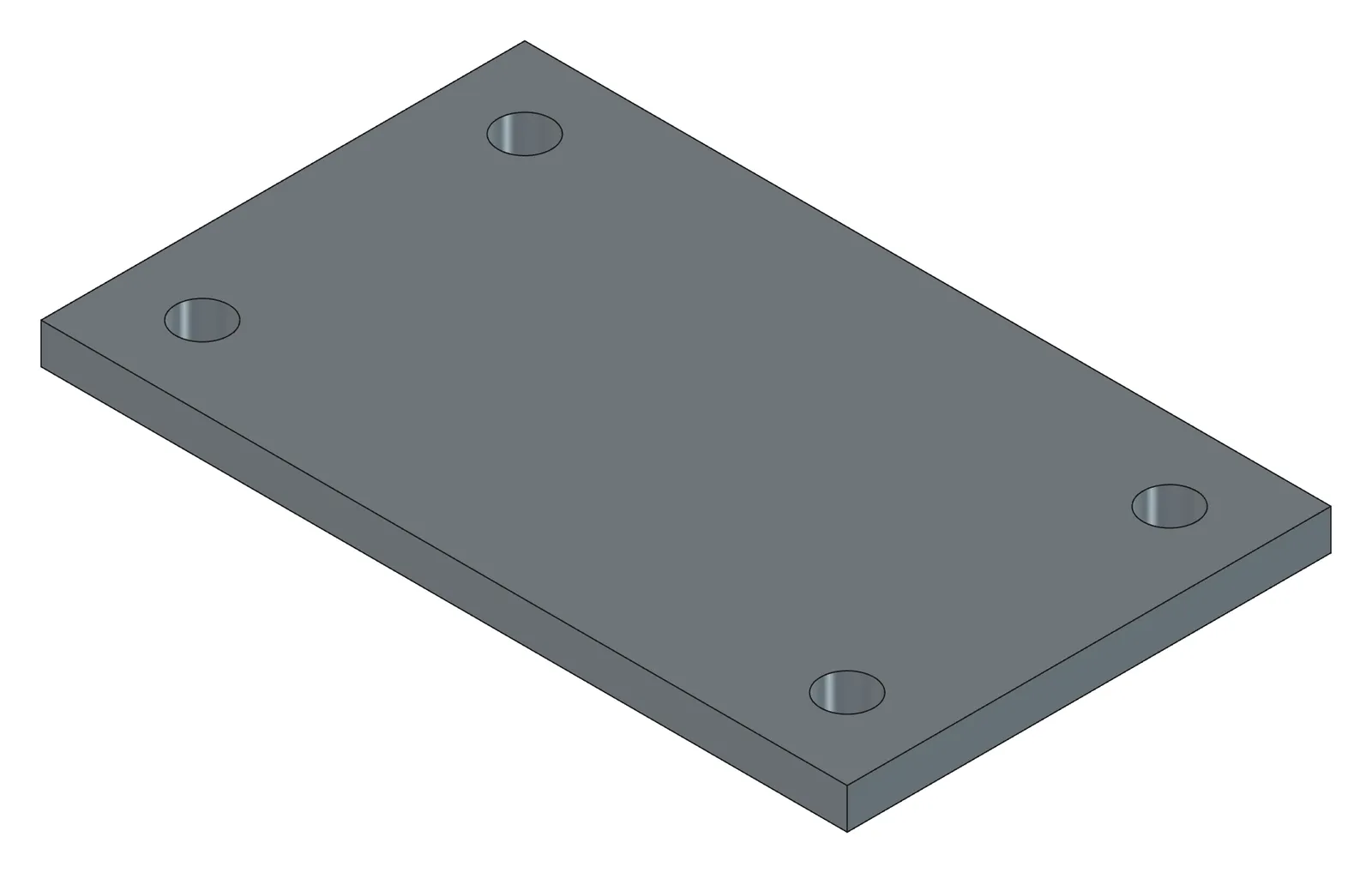
Section titled “2. Make the plate”A 100×60×5 plate, origin at its bottom-left corner. Put the dimensions in a Params spreadsheet as width, height, thickness. Iso screenshot when done.What the AI does — creates a Body, draws a rectangle sketch on XY with every constraint applied (DoF 0), and pads it 5 mm. The three dimensions go into the Params spreadsheet as aliases, and the sketch and the Pad reference those cells. It recomputes, confirms there are no errors, and shows you a screenshot.
How to check — the tree gains Params and Body › Sketch, Pad (the spreadsheet sits outside the Body). Double-click the sketch and the status bar at the bottom says “fully constrained”. Close to leave.
3. Drill the holes
Section titled “3. Drill the holes”Four Ø6.6 through holes, 10 in from each corner. Diameter Params.hole_d, corner distance Params.margin.What the AI does — creates a sketch with four circles at the top face height (centres at (10,10), (90,10), (10,50), (90,50)), sets the diameter constraint to the expression Params.hole_d, and cuts them through with a Pocket. It recomputes and confirms again.
How to check — the tree gains Sketch001, Pocket. Double-click Params and you see five rows (width 100, height 60, thickness 5, hole_d 6.6, margin 10).
4. Confirm with numbers
Section titled “4. Confirm with numbers”Volume, sketch DOF, hole count and whether they go through.Subtract the hole volume (π × 3.3² × 5 × 4 ≈ 684) from 30,000 and you get the right number.
5. Change a dimension — what parametric means
Section titled “5. Change a dimension — what parametric means”Do this one yourself, without the AI. Double-click Params in the tree, change thickness from 5 to 8, and recompute (F5, or Edit → Refresh). The plate gets thicker and the holes still go through. Put it back to 5.
You can have the AI do it too.
Set margin to 12 in Params, recompute, and check nothing broke.6. Save
Section titled “6. Save”Save it to D:\cad-work\plate.FCStd.How to check — the window title changes to plate and the file appears at that path. The AI does not save before you say this.
Checking your result
Section titled “Checking your result”| Item | Criterion |
|---|---|
| Tree | Params, Body › Sketch, Pad, Sketch001, Pocket |
| Sketch DoF | both 0 |
| Volume | about 29,316 mm³ (at thickness 5, margin 10) |
| Params | width, height, thickness, hole_d, margin |
| Recompute | 0 objects in error |
When it doesn’t work
Section titled “When it doesn’t work”- “Cannot connect” — FreeCAD is closed or the server did not start. See Troubleshooting.
- The AI asks which document — close the others or give it the name.
- The holes ended up outside the plate — you did not state the origin, so the plate got centred on the origin. Add “the bottom-left corner of the plate is the origin” and ask again.
- The sketch is not “fully constrained” — say “the Sketch still has degrees of freedom. Find what’s missing and show me candidates.” Same flow as Exercise 6.
- The plate went downward — say “reverse the Pad direction”.
Going further
Section titled “Going further”- Add R5 fillets on the four vertical edges and C0.5 chamfers at the hole mouths.
- Instead of Ø6.6, just say “clearance holes for M6 bolts” and see what diameter the AI picks.
- Take this plate through Exercise 7 and produce a three-view drawing.
What runs behind the scenes
Section titled “What runs behind the scenes”| Step | Tools |
|---|---|
| Connect | ping, list_documents |
| Plate and holes | build_features (pad, pocket, params) |
| Check | tracked_recompute, get_screenshot, analyze_shape, find_holes, get_sketch_diagnostics |
| Save | save_document |